自然语言(NPL)处理入门之单词计数
·
1.软件基础:
python 3.7
pandas库
excel(选用)
2.思路分析:
读文本→拆分文本→单词计数→归纳整合→最终效果展示
3.代码:
#coding=utf-8
#designed by liuxiawei1996@outlook.com
import pandas

def readcontext(inputpath):
    f=open(inputpath,'r')
    # 按行读取存入列表,列表中子元素为一行文字
    text=f.readlines()
    return text

def splitwords(text):
    re=[]
    # 将列表中的每行文字按空格拆分,去掉换行,大写转成小写
    for i in text:
        re.extend(str(i).strip('.\n').lower().split(' '))
    return re

def create_and_calucatedict(re):
    #因为是单词计数,字典比较适合
    worddict={}
    for i in re:
        #每读入单词判断在字典key中是否存在,不存在创建该单词key,vulue默认=1
        if i not in worddict:
            worddict[i]=1
        #读入单词在字典key存在,value+1
        else:
            worddict[i]+=1
    return worddict

def output_txt(outputpath,worddict):
    #将结果输出到txt
    f=open(outputpath,'w',encoding='utf-8')
    string=str(worddict).lstrip("{'").rstrip("}").replace(',','\n').replace("'",'').replace(' ','')
    f.write(string)
    f.closed

def output_html(worddict):
    #将结果利用pandas输出到html
    df = pandas.DataFrame(worddict, index=[0])
    df_T = df.T#因为结果横向显示太长,转为转置矩阵
    #我试了一下好像html不能转,只有excel能转,尴尬......
    df.to_html('wordcount.html')

def output_excel(worddict):
    # 将结果利用pandas输出到excel
    df = pandas.DataFrame(worddict, index=True)
    df_T = df.T#因为结果横向显示太长,转为转置矩阵,
    df_T.to_excel('wordcount.xlsx')

def main():
    text = readcontext('article.txt')
    re = splitwords(text)
    worddict = create_and_calucatedict(re)
    output_excel(worddict)

if __name__ == '__main__':
    main()
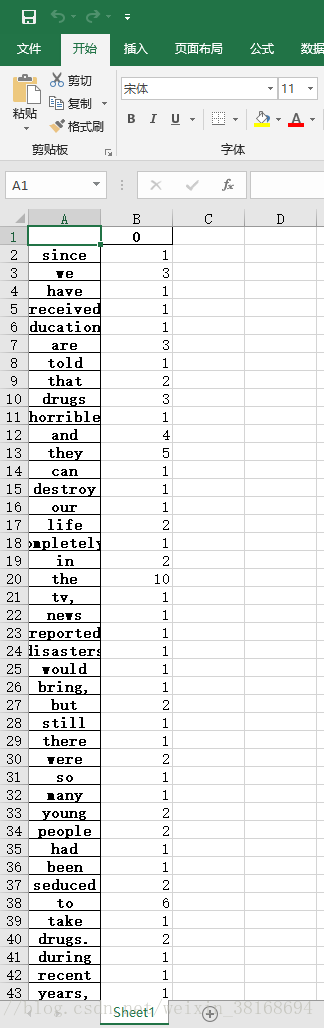
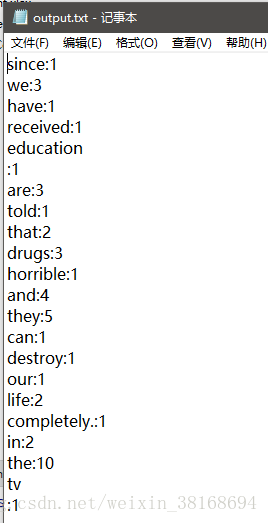
4.结果展示:


聚焦前沿AI与大模型技术探索,汇聚开发者及爱好者,共享开源项目、学习资源与行业资讯。
更多推荐



 2
2 0
0- 0


 已为社区贡献4条内容

所有评论(0)