博客自动增加阅读量
目的
用HttpClient包进行Get请求,从而增加博客的阅读量
步骤
1 拿到所有博客的URL:
我们的博客都是
https://blog.csdn.net/用户ID/article/details/ 文章ID(8位)
用户ID很好拿,而所有文章ID可以通过列表的方式查找: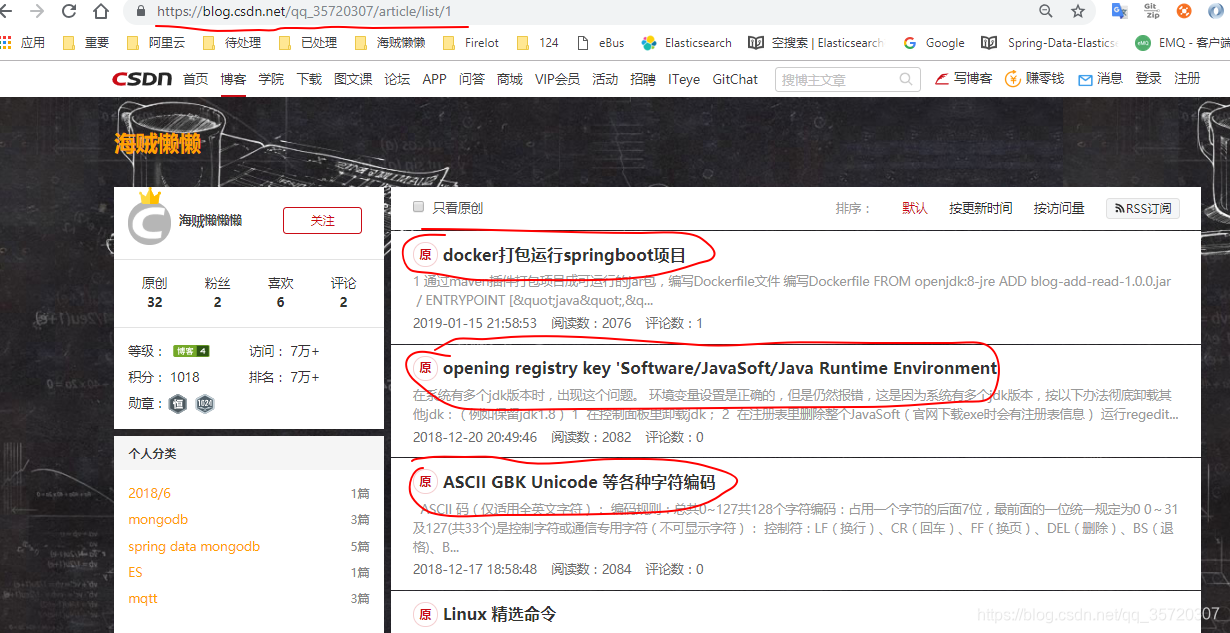
我们可以通过GET请求拿到这一页的HTML,然后遍历查找出以
https://blog.csdn.net/用户ID/article/details/ 开头的所有URL
准备条件
pom.xml :
       <dependency>
            <groupId>org.springframework.boot</groupId>
            <artifactId>spring-boot-starter</artifactId>
        </dependency>

        <!--http工具包,模拟Get,Post等请求-->
        <dependency>
            <groupId>org.apache.httpcomponents</groupId>
            <artifactId>httpmime</artifactId>
        </dependency>

        <!--fastjson-->
        <dependency>
            <groupId>com.alibaba</groupId>
            <artifactId>fastjson</artifactId>
            <version>1.2.46</version>
        </dependency>
编写基础类
public class HttpUtils {

    private static final RequestConfig defaultConfig;

    // 获取返回的cookie(访问Url前塞进HttpClient)
    private static  BasicCookieStore cookieStore = new BasicCookieStore();

    static {
        // 设置超时时间等配置
        defaultConfig = RequestConfig.custom().
                setSocketTimeout(10000).
                setConnectTimeout(10000).
                setConnectionRequestTimeout(10000).
                build();
    }

    /**
     * 获取client
     *
     * @return
     */
    public static CloseableHttpClient getClient() {
        // 采用默认方式获取client,默认方式会通过连接池建立连接,并且设置Cooike
        CloseableHttpClient client = HttpClients.custom().setDefaultCookieStore(cookieStore).build();
        return client;
    }

    /**
     * http post请求,json格式传输参数
     *
     * @param map 参数对
     * @param url url地址
     * @return
     */
    public static String postWithHttp(Map<String, Object> map, String url) {
        HttpPost httpPost = new HttpPost(url);
        httpPost.setConfig(defaultConfig);
        StringEntity stringEntity = new StringEntity(JSON.toJSONString(map), Consts.UTF_8);
        stringEntity.setContentEncoding("UTF-8");
        stringEntity.setContentType("application/json");
        httpPost.setEntity(stringEntity);
        return execute(httpPost);
    }

  /**
     * 执行请求并响应
     *
     * @param httpPost httpPost
     * @return 结果流字符串
     */
    public static String getWithHttp( String url) {
        HttpGet httpGet = new HttpGet(url);
        httpGet.setConfig(defaultConfig);
        return execute(httpGet);
    }

    private static String execute(HttpRequestBase httpPost) {
        if (httpPost == null) {
            return "";
        }
        try {
            CloseableHttpResponse response = getClient().execute(httpPost);
            if (response.getStatusLine().getStatusCode() == HttpStatus.SC_OK) {
//                 打印cookie
                List<Cookie> cookies = cookieStore.getCookies();
                if (cookies.isEmpty()) {
                    System.out.println("Cookie is None");
                } else {
                    for (int i = 0; i < cookies.size(); i++) {
                        System.out.println("- " + cookies.get(i).toString());
                    }
                }
                HttpEntity resEntity = response.getEntity();
                return EntityUtils.toString(resEntity);
            }
        } catch (Exception e) {
            e.printStackTrace();
            log.error("请求出错,", e);
        }
        return "";
    }
 }
// Springboot启动后运行
@Component
@Slf4j
public class ApplicationRunnerImpl implements ApplicationRunner {

    @Override
    public void run(ApplicationArguments args) throws Exception {
    // 解决需要登陆的情况
    //        Map<String,Object> map = new HashMap<>();
//        map.put("loginType","1");
//        map.put("pwdOrVerifyCode","xxx");
//        map.put("userIdentification","xxx");
//        System.out.println(HttpUtils.postWithHttp(map, "https://passport.csdn.net/v1/register/pc/login/doLogin"));
		int count = 0 ;
        List<String> urls = new ArrayList<>();
        // 几个文章列表
        List<String> listurl = new ArrayList<>();
        listurl.add("https://blog.csdn.net/qq_35720307/article/list/1");
        listurl.add("https://blog.csdn.net/qq_35720307/article/list/2");
        listurl.add("https://blog.csdn.net/qq_35720307/article/list/3");

		// 拿到每个列表页面的所有博客URL
        for (String s : listurl) {
            String content = HttpUtils.getWithHttp(s);
             System.out.println(content);
            int start = 0;
            int end = 0;
            String searchKey = "https://blog.csdn.net/qq_35720307/article/details/";
            while (content.indexOf(searchKey, start) != -1) {
                start = content.indexOf(searchKey, start);
                end = start + searchKey.length() + 8;
                String url = content.substring(start, end);
                urls.add(url);
                start = end;
            }
        }
      // 启动几个线程跑
      ExecutorService threadPool = Executors.newFixedThreadPool(5);
        while (true) {
            try {
                urls.forEach(url -> {
                    threadPool.execute(() -> {
                        HttpUtils.getWithHttp(url);
                    });

                });
                log.info("循环次数"+ ++count);
                Thread.sleep(40000);
            } catch (InterruptedException e) {
                log.error("error message :", e);
            }
        }
	}
}
注意
问题一:同一个IP下,一分钟内,一篇文章点击多次只会增加一次阅读量
问题二:大概1个多小时后,这个IP将会被屏蔽,该IP访问任何博客都一定会跳到登录页
解决
问题一 这个我们设置一分钟左右读取一次
问题二 所有请求我们带上登陆的所有Cookie
登陆的URL,是个POST请求,URL是
https://passport.csdn.net/v1/register/pc/login/doLogin
需要传参的格式是JSON:
{
“loginType”:“1”,
“pwdOrVerifyCode”:“你的账户密码”,
“userIdentification”:“你的账户用户名”
}
具体代码在上面注释里面,先请求后,Cookie会在每次访问URL时都会带上
后续
怎么拿到这个URL:F12后,用正确的用户名和错误的密码登陆,这个请求URL将会出来,如果是正确的密码,将会自动跳转,找不着这个POST请求了
CSDN的防护:每次登陆,有一个GET请求先验证用户名和密码,正确就会去请求真正的POST登陆,错误三次左右就会出现验证码,完成验证码才会请求真正的POST登陆
具体项目Git地址:https://github.com/TomZhangY/blogAddRead

聚焦前沿AI与大模型技术探索,汇聚开发者及爱好者,共享开源项目、学习资源与行业资讯。
更多推荐



 4
4 0
0- 0


 已为社区贡献1条内容

所有评论(0)